
Designing an Automation Pipeline That a Human Approves at the Step That Matters
An approval gate is an engineering object with four parts: a named approver, a stored pause, a resume trigger and a timeout. n8n, GitHub and AWS each ship a different one, and the difference

TL;DR
- A human approval step is a point in an automated workflow where the run pauses and waits for a named person to approve or reject it before it continues. Automation tools implement that pause in different ways: an in-pipeline wait node, a platform protection rule, or a callback token.
- An approval gate is four things: a named approver, a stored pause, a resume trigger, and a timeout that ends the wait.
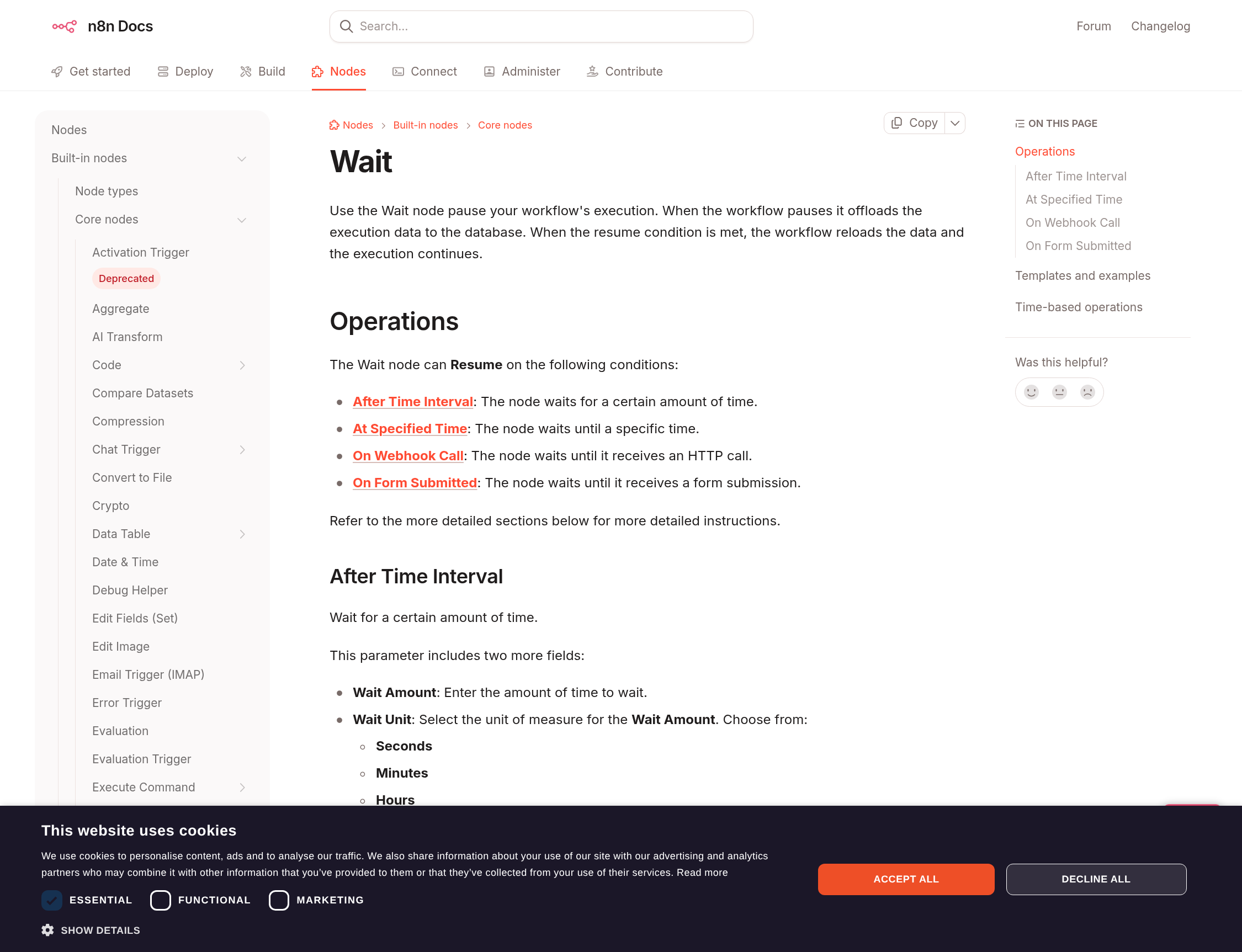
- n8n's Wait node pauses a run, offloads the execution data to the database and resumes on a form submission, a webhook call or a schedule; the resume URL is generated at runtime and is unique to each execution.
- The GitHub Actions environments hold a job until a required reviewer approves, and an environment's secrets stay out of reach until the protection rules pass.
- AWS Step Functions pauses on a callback task token and waits for
SendTaskSuccess, with a heartbeat timeout standing in for a deadline. - Put the gate at the step whose failure is expensive to undo, and make the resume action one that survives arriving twice.
The gate is a state, and something has to store it
Every automation team eventually writes the same sentence into a project brief: a human should check this before it goes out. What follows in practice is a Slack message, a spreadsheet column and an unspoken agreement that someone will look at the run before it matters. That arrangement is a hope with a timestamp.
A gate is a state. The pipeline stops at a defined point, the stop is recorded somewhere durable, and a specific person can release it. Take away any one of the three and the gate becomes theatre: a pause nobody can see, a release nobody owns, or a stop that evaporates when the host reboots. The last one is the failure that surprises teams, because a pause held in memory looks identical to a pause held in a database until the day the container restarts.
n8n is explicit about this. Its documentation describes waiting as pausing a workflow mid-execution and offloading the execution data to the database; when the resume condition is met, the workflow reloads the data and continues where it left off. That sentence is the whole design constraint. A run that can wait for three days needs somewhere to wait, and the platform needs a way to know the wait is deliberate rather than a hung process.
Three primitives that make a pipeline wait for a person
The tooling has converged on three ways to hold a run open, and they differ in ways that matter once a gate sits in front of something that writes.
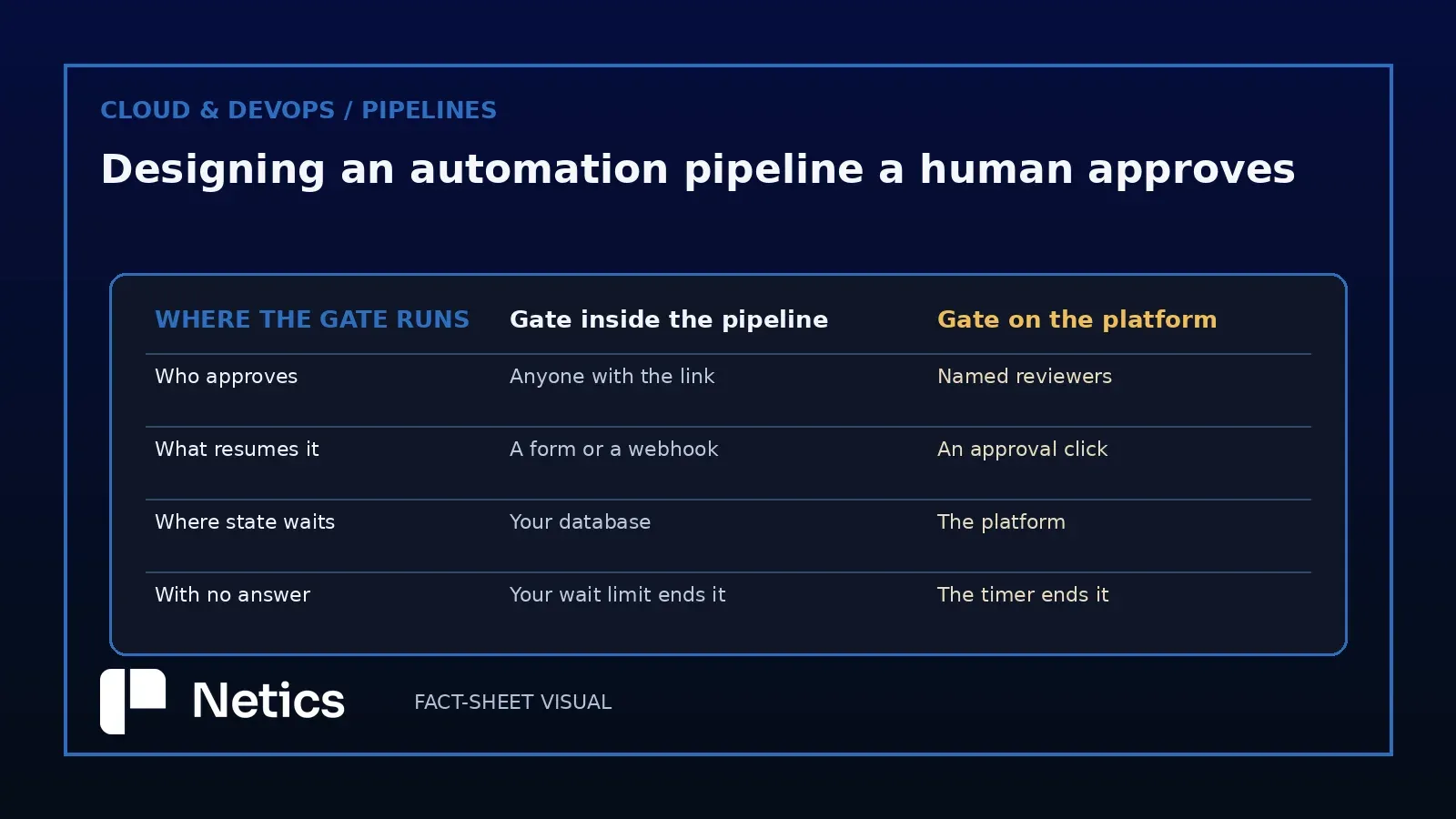
The in-pipeline wait. I run n8n in production today for Netics' own workflows, so the Wait node is the part of this design I check first. n8n's Wait node resumes on a time interval, on a webhook call, on a form submission, or at a specified date and time. The form path is the one most teams want: the run pauses, the approver sees a page, the submission resumes the same execution with its data intact. The webhook path is more flexible and more dangerous. n8n generates the resume URL at runtime and exposes it as $execution.resumeUrl, unique to each execution, and the node lets you put Basic, header or JWT authentication in front of it, or whitelist source IPs. An unauthenticated resume URL handed to a third party is an approval button anyone can press, which is why authentication belongs in the first design of the gate.
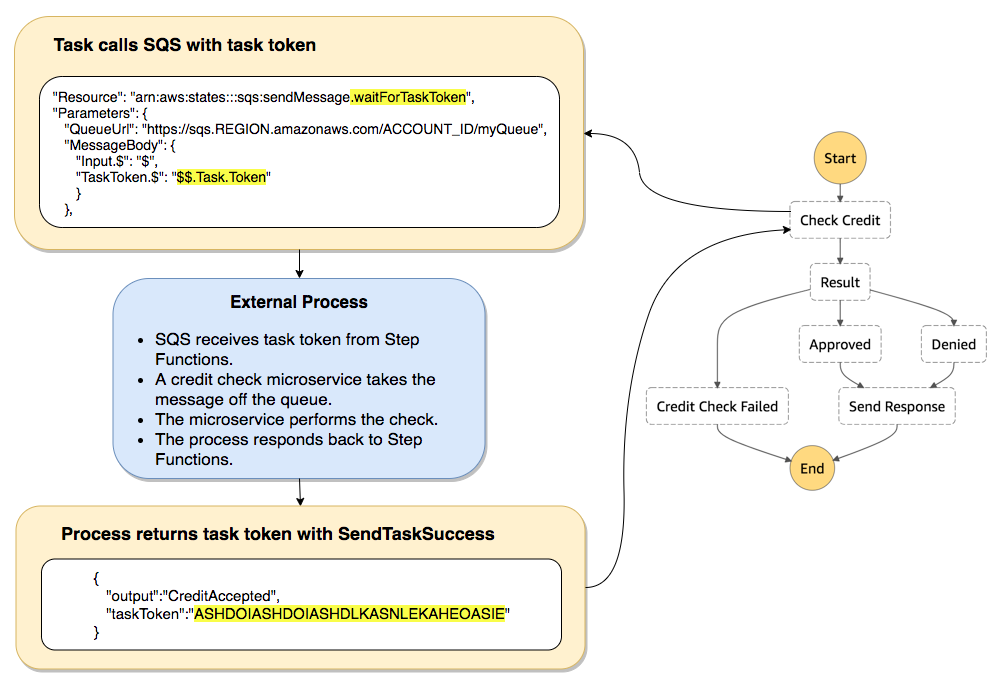
SendTaskSuccess returns it.The platform gate. GitHub puts protection rules on environments, and a job that references an environment has to satisfy those rules before it runs or reads the environment's secrets. Required reviewers can be up to six people or teams, and any single one of them can approve the job. A wait timer is a separate rule for the same environment. The two rules are worth reading together: one asks a person, the other asks for patience, and a deployment to a sensitive target often wants both. The documentation also carries the sentence that decides who can actually change this setup: anyone who can edit workflows in the repository can create an environment through a workflow file, while only repository admins can configure one. Environments work as a checkpoint inside a wider permission system.
The callback token. AWS Step Functions pauses a task until a token comes back. The task receives a token, waits, and continues on SendTaskSuccess or fails on SendTaskFailure. Two details give it character. First, the token has to be returned from a principal inside the same AWS account, which quietly rules out the most careless version of the pattern. Second, a task waiting on a token holds until the one-year service quota, so the heartbeat timeout is the only thing converting a forgotten approval into a visible failure.
Where the gate belongs inside the run
The useful question is which step earns the wait. Our recommendation: gate the step whose failure is expensive to undo, and let everything before it run unattended.
Take a concrete case. Imagine a Casablanca logistics SME whose nightly pipeline reads supplier invoices from a mailbox, matches them against purchase orders, and posts the matched ones into the accounting system. Reading the mailbox and extracting line items is cheap to redo, so a gate there buys nothing but delay. Posting into the ledger is expensive to undo, and the same run touches supplier records that a human cares about. That single step earns the gate, and the gate earns a rule: the pipeline posts nothing that a named person has not released, and the release is recorded with the invoice identifier it referred to.
Two practices make that work in production, and both are cheap. First, the approver sees the artefact itself. A notification reading "3 invoices need review" produces rubber stamps; a notification showing the matched line items produces review. Second, the approval action is scoped to the run it belongs to. The n8n resume URL already helps here, because it is generated per execution and resumes that execution's data rather than whatever is currently in the queue.
Timeouts, duplicate resumes and the approval that arrives twice
Three failure modes show up in almost every gated pipeline, and each has an answer that belongs in the design document.
The unlimited wait is the first. n8n's Limit Wait Time parameter can end the pause on a schedule, and Step Functions needs a heartbeat timeout for the same reason. Without one, a run sits open indefinitely, the queue behind it stays blocked, and nobody notices until a deadline arrives.
The duplicate resume is the second. Approvers click twice, webhooks retry, and a queue redelivers a message that looks new. The resume action has to be idempotent: releasing the same run twice should land the same result, which in practice means the effect carries a key from the run rather than an assumption that it ran once.
The disappearing gate is the third, and the GitHub Actions documentation notes it in passing: deleting an environment fails the jobs currently waiting on its protection rules. A gate is configuration with a lifetime, so removing it is itself a change worth recording.
How to put a gate in place in a week
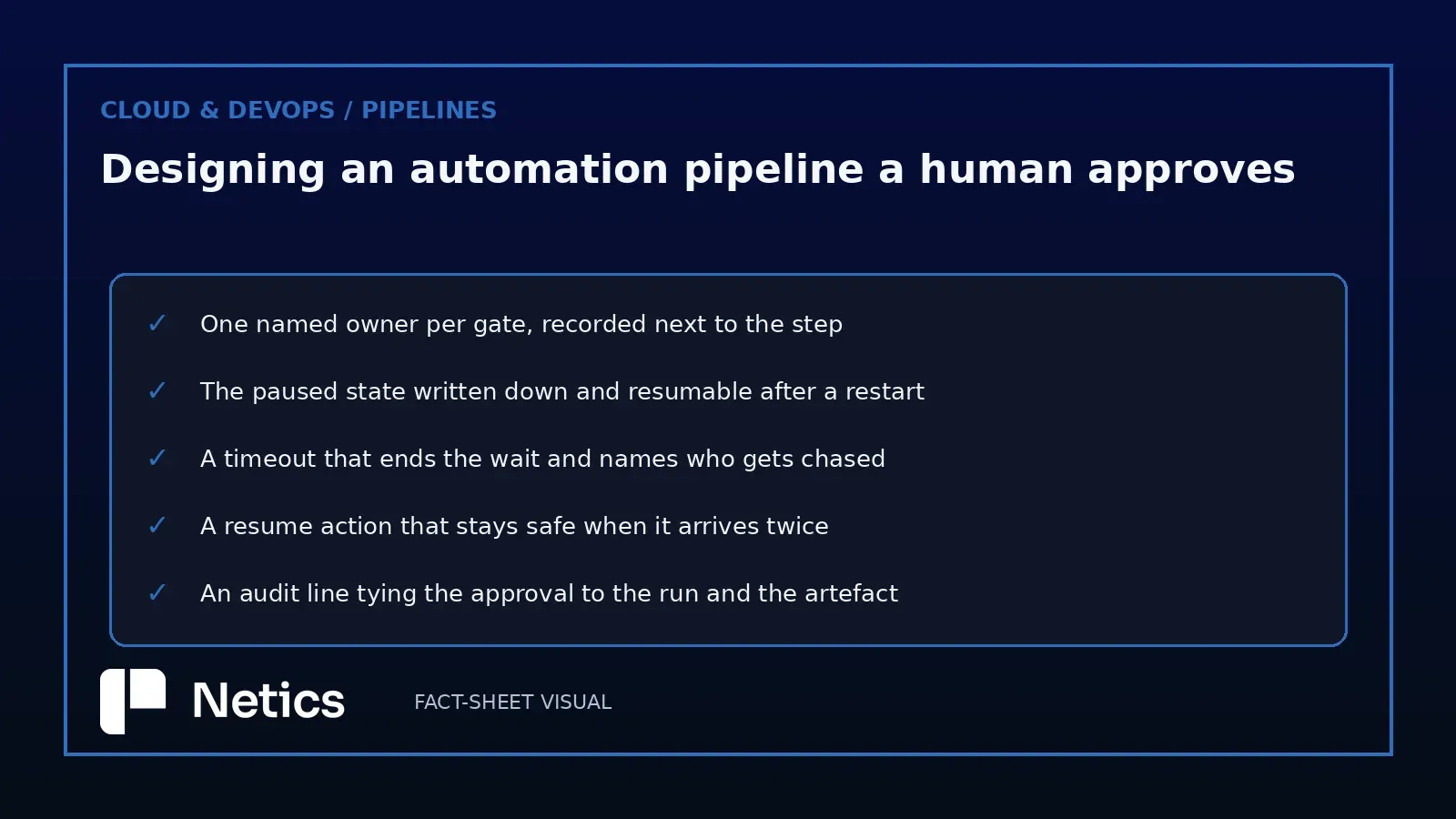
Start with a single step. Pick the write that hurts to reverse, and leave the rest of the pipeline alone for now. Name the owner of the gate in the runbook, with a named person rather than a shared mailbox, because a shared mailbox is how approvals become nobody's job.
Write down where the pause lives, and test it: stop the worker while a run is waiting, start it again, and see whether the run is still releasable. Give the gate a deadline and decide in advance what a missed deadline means, since both options — resume and report, or fail and alert — are defensible and the indecision is what causes incidents. Make the release action safe to repeat, and log it next to the artefact identifier. Then run the whole thing on a quiet day with a real approval and watch the log, because the log is what an auditor will read.
The automation pipelines with human approval offer is the shape we build when a client wants this inside their own estate: the pipeline, the approval surface and the record stay on their infrastructure, and the model, when there is one, is a component behind the gate. The same pattern appears in our earlier analysis of the OpenAI Agents API, where the interesting question was who owns the loop that decides when a human gets asked.
If you want this gate inside your own pipeline, we run a free 30-minute audit of the automation you already have — book one at neticslabs.com.
Sources
Source: Wait — docs.n8n.io/flow-logic/waiting/, retrieved 2026-10-04 (waiting pauses a workflow mid-execution and offloads the execution data to the database; when the resume condition is met the workflow reloads the data and continues). Source: Wait node — docs.n8n.io/integrations/builtin/core-nodes/n8n-nodes-base.wait/, retrieved 2026-10-04 (resume on time interval, webhook call, form submission or specified time; $execution.resumeUrl generated at runtime and unique to each execution; Basic, header or JWT authentication for the resume webhook, IP whitelist, Limit Wait Time). Source: Managing environments for deployment — docs.github.com, retrieved 2026-10-04 (deployment protection rules on environments; a job referencing an environment follows its protection rules before running or accessing its secrets; up to six required reviewers and one approval sufficient to proceed; wait timer; environment secrets reachable only after the rules pass; deployment protection rules such as required reviewers and wait timers available on GitHub Free, Pro and Team plans only for public repositories; anyone who can edit workflows can create environments through a workflow file while only repository admins can configure one; deleting an environment fails jobs waiting on its protection rules). Source: Wait for a Callback with Task Token — docs.aws.amazon.com/step-functions/latest/dg/connect-to-resource.html, retrieved 2026-10-04 (callback tasks pause a workflow until a task token is returned with SendTaskSuccess or SendTaskFailure; tokens must be passed from principals within the same AWS account; a task waiting for a token waits until the one-year service quota; HeartbeatSeconds sets a heartbeat timeout). Internal linkage: The OpenAI Agents API Makes the Harness a Managed Product. More on Netics' work at automation pipelines with human approval.
Source: n8n documentation — docs.n8n.io, retrieved 2026-10-04; GitHub documentation — docs.github.com, retrieved 2026-10-04; AWS Step Functions developer guide — docs.aws.amazon.com, retrieved 2026-10-04. Figures: official n8n and AWS documentation images, retrieved 2026-10-04.